Monday, October 20, 2008

GIMP Digiscrapping Tutorial - "Creating a Sticker WordArt in Gimp"

Are you ready to give this next tut a go? Well, this is my version of creating a simple WordArt anyway...

Photobucket

Create a text layer for each WordArt line.
In this example I have "Cherish" & "every moment" using 2 layers and different font for each.
Select Elliptical select Tool (E) and with "Cherish" text layer selected, create an elliptical selection larger than "Cherish" text.


Create New Transparent layer below "Cherish" text layer, and fill with White Background colour.


Select "every moment" text layer, do Alpha to Selection, Select > Grow & grow selection by 14 px.


Create New Transparent layer below "every moment" text layer, and fill with White Background colour (Ctrl+.).


Now move your 2 newly created white filled layers together below the text layers and Merge down together.


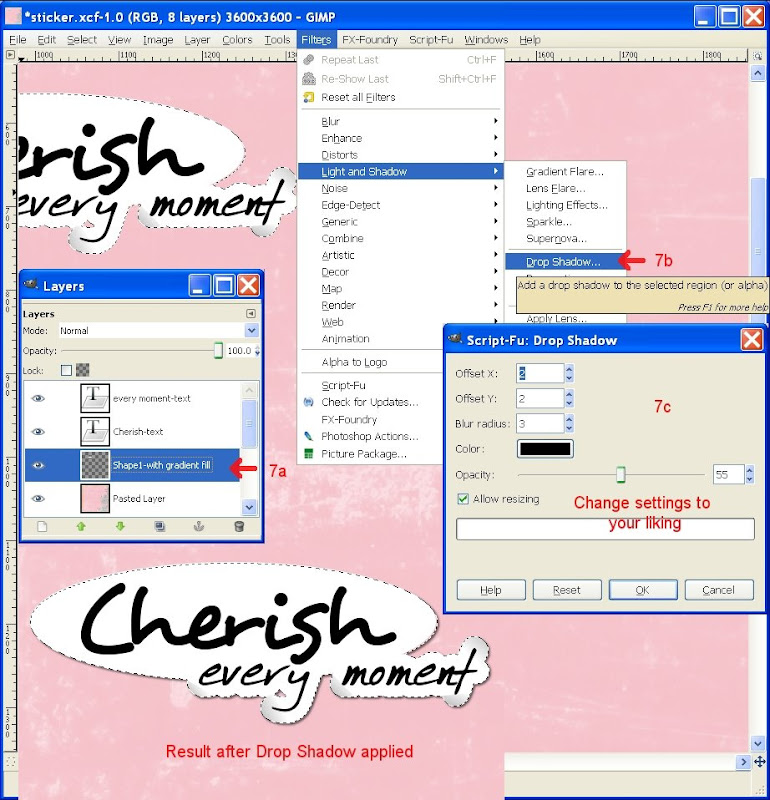
We will now try and create a slight sticker lifting/curling using the Gradient tool to mimick shadowing.

  • Select last merged layer, do Alpha to Selection, select Free Select Tool (F) with Intersect Mode selected, and click selection points around the area where you want to have your gradient shadow & finish by clicking your first selection point to end the selection.
  • With Blend Tool selected (L), this will fill your selection with a gradient colour, pick a grey Foreground colour, Blend Mode = Normal, Opacity to your liking, Gradient set to FG to BG, shape = Linear.
  • Click & drag your mouse at an angle where you want the curling shadow to go from grey to white.
Repeat above bullet point instructions where curling shadow is required.


Finish by applying layer shadow.
From In my Digi GIMP world

Thursday, October 16, 2008

Happy 12th birthday CJ


Oh the surprise on your face was priceless yesterday after school when you received your presents a day earlier. Well, there was no point in leaving it till Thursday with early morning school routine and you going to your Dad's in the evening. We hid your present at Lynn's these last few weeks after BB spotted this bike for you for sale. Your Dad and grandparents got your helmet and with the 2 dirt bikes now you guys can ride together. We quized you later what you thought you were getting for your birthday and said a trampoline as BB had mowed the lawns in Corey's area, so it was great to see you had no idea at all that a dirt bike was coming. A quick change later & BB showed you the ropes across the road from us and away you went. You handled the bike very well and stayed on when you did your 1st wheelie and managed to stay on! Not the case when later you picked up too much speed going up hill and not keeping your weight forward, but you did the right thing and jumped clear of the bike. As BB put it, these bikes are made for off road and spills! Your cousin Hamish dropped by on way home from school as he spotted us along the road. He too has a dirt bike so I can only imagine the fun you'll have together later on when you get better.

Won't be long now when you get the hang of the clutch and can kick start the bike yourself, well there is always the weekend now for practising...

Monday, October 13, 2008

Piñata dramas

I finally got started on CJ's birthday piñata on my day off on Friday. The day started of well with CJ & I of early to the shops to buy the goodies. Several shops later, we made it home to start a productive afternoon. CJ picked a big smiley face as the theme while searching numerous images until he spotted the perfect looking face, then he set off to blow me the balloon while I got onto making the flour paste. That was until I said to blow it bigger due to small size & then it popped! Darn cheap crap, turned out to be small balloons. So had to dash of to the shops again for better ones, grumble - grumble….

Got back, this time with helium quality big balloons and with DS's help the paper mache-ing finally started mid-afternoon. From memory, I think we got 2 layers done that day.

Saturday proofed to be such a stunner of a day, got another layer done before BB and I went of to the Hutt to pick up free tickets to 'Abba Mania' from sister in-law's place and yummy curry lunch while out. We got back and I applied layer 4 and thought to speed up the process, would leave the piñata in the car to dry out while it was parked in the sun. I toddled of to help BB with the grass clippings, checked 2 times for dryness and thought to leave it a little bit longer. 10 Minutes passed and I checked up on piñata, by which time it had badly EXPLODED with 3 major rips. I could have cried! In the heat of the car, the balloon under the multiple layers had expanded until the paper mache could no longer resist the pressure. GREAT! Don't really have time to start all over again, so did the last choc & lollies shop, filled the badly ripped piñata with all the goodies and taped up as best as I could the rips and continued paper mache-ing. It doesn't look to bad now. A few more layers and I'll be finished, ready for painting. What a drama...

Thursday, October 9, 2008

GIMP Digiscrapping Tutorial - "Lets Grunge some Title Text in Gimp"

There are endless amount of grunge brushes available, just do a google search on "Photoshop free grunge brushes", use the following site http://hawksmont.com/blog/gimp-how-to-add-brushes/ to help you with installing/adding Photoshop/GIMP brushes in GIMP. It has been a lifesaver for me in the past.

So here we go, this is what my tutorial is all about... Please leave a comment to let me know what you think.

grunge-med

Type your title in a wide font, I choose Braggadocio.
Select Eraser tool, from Brush selector pick a grungy type brush, set Opacity <= 80, Set Scale to a size so that the brush you use looks smaller than the font.


Ensure your title layer is selected, click & drag your mouse over the text and see the title getting 'grunged'.


Continue erasing/grunging all letters of your title.

Change your Foreground colour of your choice, select Alpha to Selection, and fill with ForeGround colour (Ctrl+,), Select None (Shift+Ctrl+A).
And you are done.


Credits: Automnal Sweetness QP by Choukette

Wednesday, October 8, 2008

GIMP 2.6.0 is Here!


Yip, am late back from squash & too hyped up to find my pillow. We had a home game and I had a good win. Brian reckons I am too serious on court, that might be so but if I concentrate and block everything out I tend to do much better. That might come across as serious, I just leave the socializing till afterwards. It was a 2-2 draw, team Northern just won by a winning game, never mind girls - still a good effort.

Found out a couple of days ago that there was a new version out of gimp. So thought to bite the bullet and go all the way from 2.4.2 to 2.6.0 and it has been smooth sailing so far. Have had no probs with installing my old brushes and it looks it still recognizes my stash of scripts, so fingers crossed I took the leap of faith and went with something very basic a QP with just some added text and a play with brushes. I haven't as yet caught up with all the latest release notes but it sure looks a beauty so far.
Find the release notes here http://gimp.org/release-notes/gimp-2.6.html and the latest download here http://gimp-win.sourceforge.net/stable.html. Thanks Nikkiana...

Credits: Automnal Sweetness QP by Choukette

Tuesday, September 30, 2008

I won a kit - Yippee


How cool is this, I entered my "Are we there yet?" layout see my Another squash weekend has started post in a Travel challenge at ScrapbooksGoneDigital and found out today I had won. I got my confirmation email from Vanessa this morning, many thanx Scrapness. So far I have managed to download the 1st part of the kit, unfortunately our download speed is veeeeeeeeeeeery sloooooooooooooow! So will have to pick my times I think, never mind. Should be fun pulling out last year's Halloween party photos, and create using my winnings. No Halloween party this year as Steve and Jade are getting married back in San Diego on Halloween, how cool is that!


Credits: Huge Halloween kit at ScrapbooksGoneDigital

Wednesday, September 24, 2008

Mo GIMPed in pink


Just completed my very own girlie page and just love how the shades of pinks have turned out. I got my hands on a whole stack of baby & childhood photos from Mum's a few weekends ago and have been busily creating lo for my up coming 40th next year - moan groan. I won't be publishing them all here, so if you are curious you'll just have to come and celebrate with me ;)! So far have done 4 so am really motoring along and it is sure neat to share those old pics with BB & CJ.

Credits: Bouille Template8, Inspired Papers & Elements by Ami Collofello at PixelGypsyDesigns, SoftPlum feather by Fryske, Glassy Alpha by K Aagard at http://digidelights.blogspot.com

Thursday, September 18, 2008

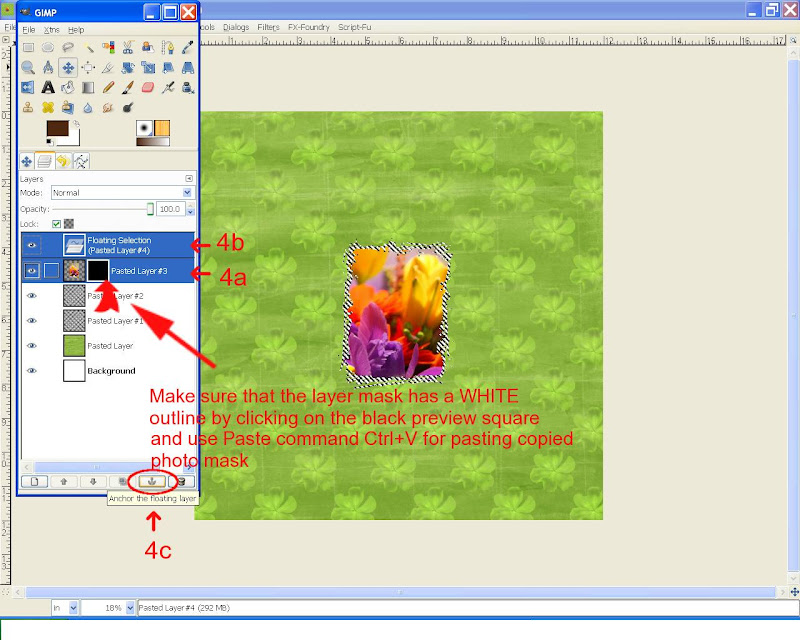
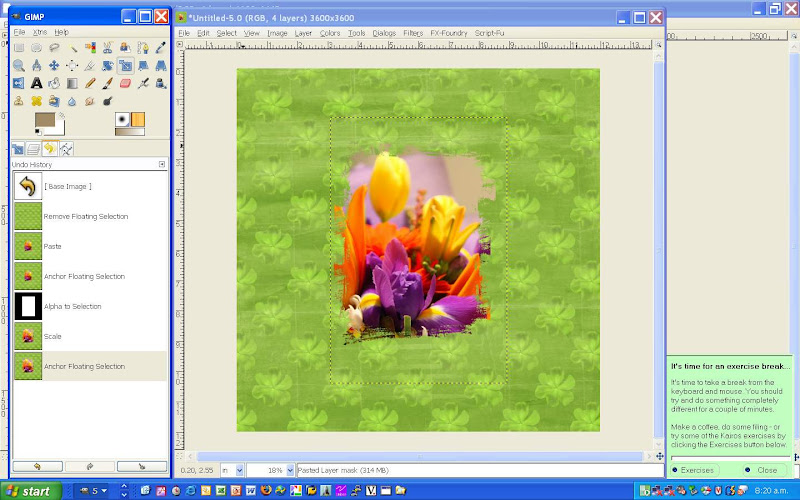
GIMP Digiscrapping Tutorial - "How to use Photo Masks in Gimp"

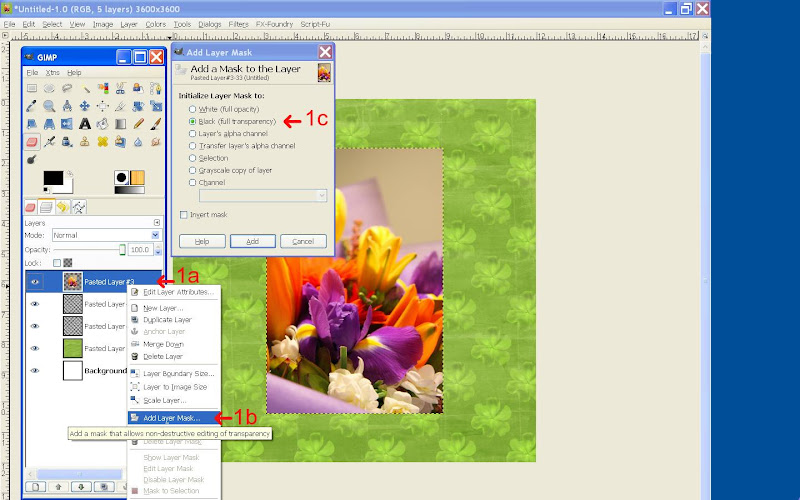
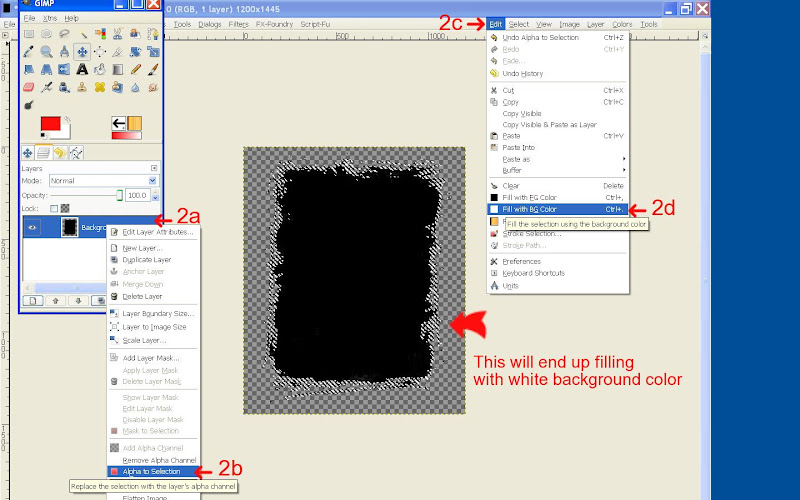
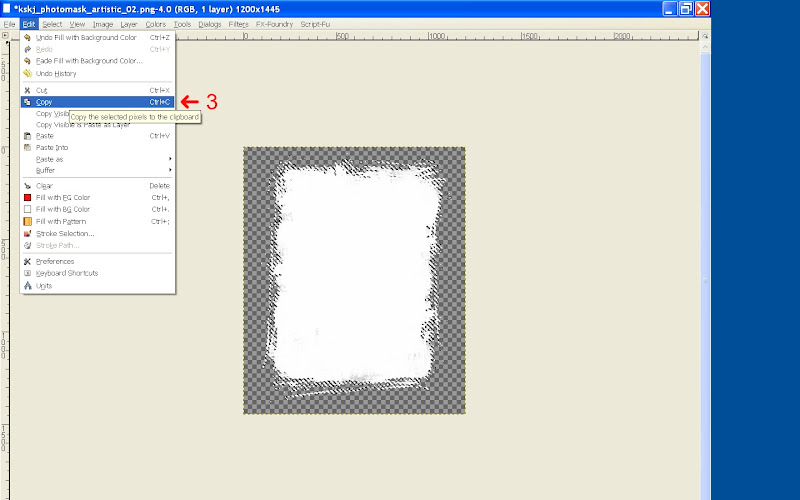
Here is another instalment of a Gimp Digiscrapping tutorial covering the usage of photo masks. This question was posted at ScrapbooksGoneDigital, so have created some screenshots with instructions.

Open your GIMP scrap layout:

From Blogger Pictures
Next open your Mask .png file in a separate window, keeping your GIMP scrap layout also open:
From Blogger Pictures

From Blogger Pictures

From Blogger Pictures

From Blogger Pictures

From Blogger Pictures

See my In training post for the finished LO.

Happy Gimp photo masking everyone

Credits: photomask freebie by Kristin Skjæringrud at http://www.scrapwithtemplates.com/

Thursday, September 11, 2008

Another squash weekend has started

This week it is our senior club champs, and BB had his 1st game tonight. But I was sure that he told me a few nights ago that I was Thursday and he was Friday. So I took my gear down just in case, but it wasn't required as all the ladies games are all starting on Friday night. The ladies draw is a bit dissapointing with only 5 entries, but oh well I'll should have a good second match. As per usual, I have Gemz for my first match, maybe she'll go easy on me, but probably not! BB didn't have a win, but he won the first game. We didn't stay late at all at the club as we were expecting Kim & Stacey to arrive with Tess who is staying this weekend as the Grieve's will be away, K's present to G. We have hyped up Corey without trying to give away Tess' name. Both dogs will get a good workout entertaining each other this way - hehe.

Wanted to scrap these road trip photos from last year for a travel challenge I'll enter at ScrapbooksGoneDigital.
Not so much a destination layout, but I do like how this one has turned out. Including the blended photo of me driving the Mazda.

Credits: LDD VintageDreams-Retro papers & alpha, Date-Bit by Misty Cato, doodle by Fryske,
Elegant WordArt by Bethany

Tuesday, September 9, 2008

No, no, NO - ski weekend photos lost, BUGGER!


I have tried and tried, but the ski photos that were sitting on Brian's camera for some reason can't download. It keeps wanting to reformat the card in either re-play or shoot mode. Had some nice shots when we were on the slopes and inside the Snowflake cafe while sipping our hot chocolates. So only have these cafe scene ones while lunching with the Wins in Ohakune.

Correction: Lynn spotted a spelling mistake on my coffee prayer on lo1, so have corrected and re-uploaded. Thanks Lynn for spotting and letting me know.

Credits: LDD VintageDreams-Retro papers & elements, Vicki's A work in progress AcrylicAlpha, Template14 by Jillian Zwick of J.Z. Designs, flower, brad * chickenwire "Believe In" by Fryske.

Sunday, September 7, 2008

Screenshots for GIMP create pencil lined (Highpass) tutorial post

Here are screenshots for my previous post...

From Blogger Pictures
From Butt-kins Web Pages
Credits: Little Dreamer Designs "VintageDreams Retro" paper

Thursday, September 4, 2008

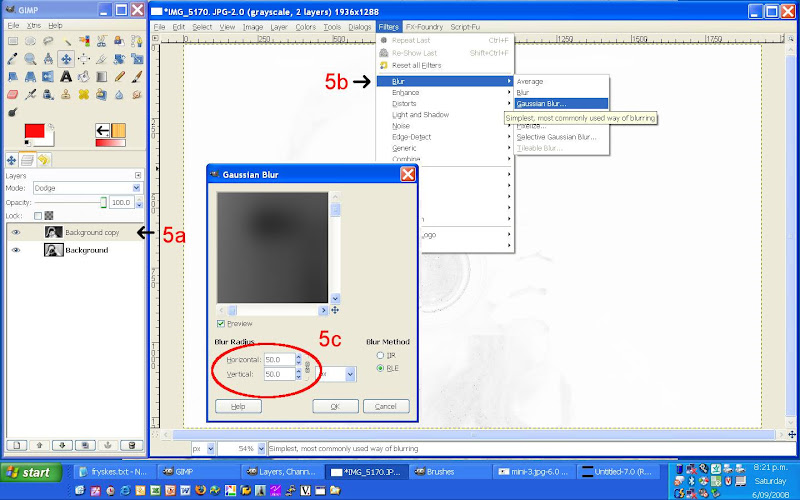
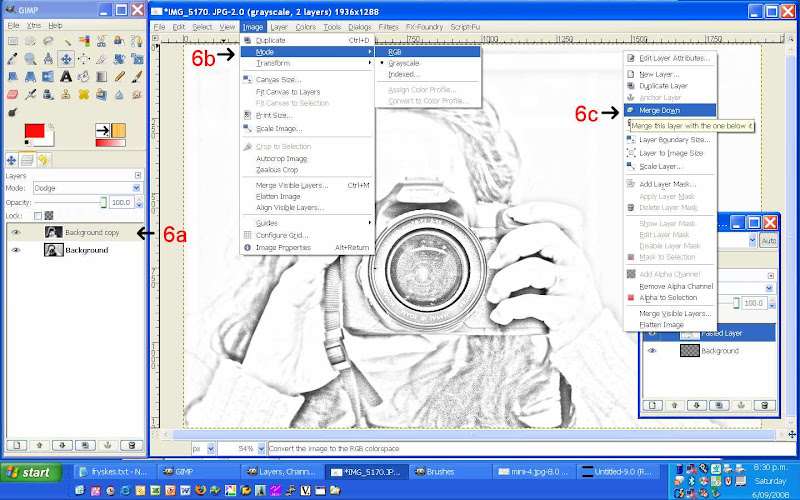
GIMP Digiscrapping Tutorial - "Create pencil lined like drawing in Gimp"

The following is a pretty cool technique to use on your photos and Scrapness over at ScrapbooksGoneDigital asked me how I did this, so here are the instructions.

Start with just a single photo and perform the following instructions:
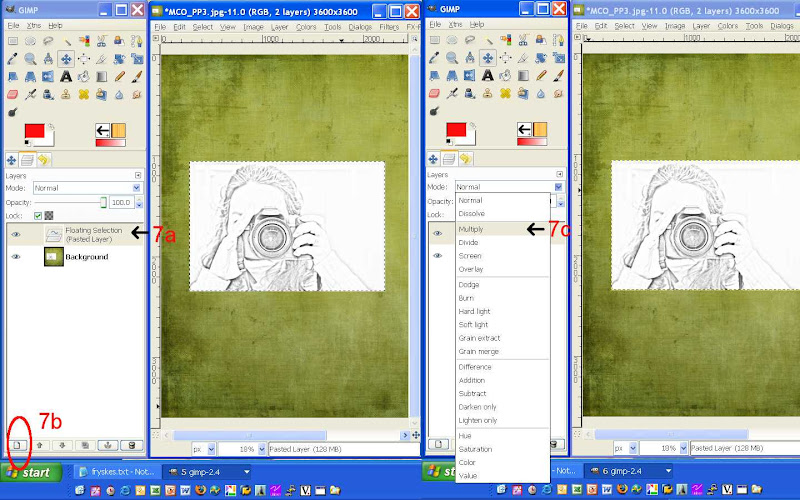
* duplicate photo layer - apply the following to the copy of photo

* Colors > Invert
* Image > Mode > Grayscale
* set the blending to colour dodge (don't worry if your layer goes all white, the next instruction will reveal all
)
* Filter > Blur > Gaussian blur
- about 50 radius setting
* Image > mode > RGB and merge layer with 1st original photo layer
* now add just merged photo to your layout page and set blending to overlay (I used multiple) Happy scrapping

Credits: Meadow kit by Rainbow, heart messystamper by Misty Mareda, chicken wire, tied bow "Believe in" kit by Fryske, dymo font

Tuesday, September 2, 2008

This is {Me} too


Feeling a bit shattered today, but can't put my finger on the cause. Will try and have an early night tonight and see if that makes a difference. BB and I are having an early dinner out with his family tonight, my suggestion as we didn't get a chance to see them on Sunday, so a night off cooking mid-week is a bit of a treat.

Have just completed this lo for a challenge over at ScrapbooksGoneDigital I am currently participating in called "Introduce yourself Challenge" and was looking for an appropriate photo of moi, when I came across this action shot. I am rather pleased the way it turned out and have included some minimal facts about myself.

Credits: Optimism Template, dotted paper & alpha "Love in Paris" by Kristin Aagard at http://www.digidelights.blogspot.com
UrbanJungle paper & elements by Coralee Evans aka MzCora

Sunday, August 31, 2008

Win some, lose some

Junior club champs just finished yesterday at our club and Colin participated quite well. First game was on Friday night which he lost and meant he moved into the plate for his draw. This was followed up with a win on Saturday morning and meant he made it to the Plate final at 2pm that afternoon. Turned out he had to play his class mate Aaron from school, unfortunately Colin got beaten but he did so with a smile on his face and wasn't worried about the result. He certainly has improved over these last 3 weeks as him and I have had at least a couple practices a week after school, he now has fewer faulty serves and the aim now is to work on his backhand next and stop him from over running his shots. Something we will work on over spring and summer to give him a head start next year as the junior season has now come to an end. CJ didn't get a price but got a Subway voucher for his smile and attitude on court! All 3 Jamiegees did very well, finishing all 1st in their draw, well done guys! Will post some squash photos later when I get some more time.

Here is another LO I completed this morning and was working on at the club yesterday.
credits: SgD Template 7, SgD Club PS 3 at http://www.scrapbooksgonedigital.com, Stierney Preppyboy addon paper,
Little Dreamer Design VintageDreams Retro

Tuesday, August 26, 2008

Good excuse for a Mulled Wine weekend


Well, we didn't get as much skiing done as we had hoped this last weekend. All started with having to wake up at 3.30am on Friday morning as we wanted to be on the road by 4.30 as we had a 5hr drive to Taupo first to drop off one of Brian's work vans, now surplus to requirements. As you can imagine, not the easiest of drives with only about 4hrs of sleep and me driving our fully loaded family car following Brian in the van in darkness for about 3 hours until sunrise! We made it to Taupo, dropped the van off and turned around for a drive back to Ohakune to our cosy accommodation for the weekend and made it in time for some afternoon skiing at Turoa ski field. Visability was prety much non existent, but we were just happy to have gotten in some skiing at least. Couldn't take any pics as we skiied in the rain, never mind. Saturday morning wasn't any better, still no visability and we were so keen to try our upper mountain ski passes. We did our 1st run in white out conditions while looking for a particular trail down I wasn't able to find. After making it to the bottom we decided that the conditions were just too crap, so decided on a refund on our all day pass and head back to Ohakune to join the rest of the Win family for lunch in town. As you guessed it, Murphy's Law, the mountain decided to clear and we missed out on the best skiing we could have had, apparently it was warm and clear blue skies - oh well lunch was very nice and we still had mulled wine left over from the previous evening, yum yum. Sunday was total blizard conditions, no chairlifts were going, so Morgan & Colin hired out a toboggan each. The fun didn't last very long in those conditions & to top it all Morgan got hurt sliding over the bank and hurting his lower leg on a water hydrant and needed some medical attention when his leg swelled up with a nasty looking bruise, which turned out to be a broken leg - poor Morgan! So that left just a half days skiing on Monday afternoon after we all packed up in the morning. We did our best skiing on our last day with visability of about 1km. With plenty of runs down we all improved some what & Colin now out skiis us both, the little speed demon - haha.
Well, we must have done ok as I can feel plenty of sore muscles today...

Tuesday, August 19, 2008

Just a quick post


The weather is settling down into fantastic skiing weather, with Friday so far shaping up quite nicely for a half day skiing. We can't wait.
Just posting a quick lo I finished over the weekend of a get together with friends bowling now a few months back. Hopefully this will load quickly, so I am not late for training again - hehe. Well Murphy's Law, blogger got stuck on me so am uploading it now 3 hours later and was late for training again!
Just did a big shop, isn't it funny how you always manage to spend more then you set out especially when you shop for goodies to take away for our ski weekend. We won't be starving, that's for sure...

credits: Digitreats RUN paper, Twoboyz00 paper (recoloured), Flerg's A Mother's Love Stitched flowers,
Vicky's AWP BabyBoy alpha, Stitched arrow Monique Gascon


Monday, August 18, 2008

Boyz & their toyz

What a busy Saturday we just had. Brian inherited an old farm/dirt bike from his brother, so once we got it back home, it didn't take long before all 3 boys got riding it. Corey is so into wanting to be into all the people action, so being on a dirt bike wasn't a worry to him. BB took him for lots of rides then Colin was next. He has been wanting a bike for a while, only natural when both his older brother and Dad ride too. CJ can't touch the ground yet, but in 1st gear he looks very much in control, doesn't he? Well, the smiles just said it all.
Then BB & I were of in the evening to our friend Geordie's 50th, great party catching up with good friends and didn't see our bed for the evening until 4am.
Sunday was spend recovering ;) but we did manage to pick up some new ski pants for the boys, BB's seemed to have shrunk - not! Also got measured up for some skis & boot hire, hopefully we get some good skiing in - there is over a 3m base at present but weather has not settled down as yet. Lets keep fingers crossed.

Wednesday, August 13, 2008

In training


Last time Colin went to junior squash night he wondered if he could put his name down for our junior club champs at the end of the month. I said of course he could as it was open to all junior members and he remembered how much fun he had last year, plus the goodies he got for just participating. So I suggested that perhaps he would like some extra practice during the week after school. CJ now catches the train to the club where I meet him from my work and we practice twice a week. It is paying off as his serves and game has already improved somewhat in the short space of time.

Finished scrapping my birthday blooms from last month, gorgeous aren't they!

credits: Hoosfunky papers by Amy Sumrall, Datebits date by Misty Cato, Quote by Anna Aspen, frame by Kristin Skjæringrud, overlay created from UrbanJungle flower by Coralee Evans.

Tuesday, August 12, 2008

OMG, Bethany created my Dog Tired WA request


Well, did I get a pleasant surprise this morning when I just happend to checkout http://elegantwordart2.blogspot.com/, low & behold there it was her latest post titled "Dog Tired". I started reading and came to the 2nd paragraph and I let out a squeel of excitement as I read "This WordArt request is from Maureen." I had left a little comment on her blog that I was looking for a Dog Tired WA and ended up altering one of her old ones, see my previous post.

So here is the revised version with a special thanks to Bethany for her wonderful word art. Such a talent!

Be on the look out for my next GIMP tutorial, I'll be covering creating manual/perspective shadow as applied to WA and I have used a little bit of gradient on the corners to make it look it has a slight curl.

Credits: dog WordArt - Elegant WA by Bethany, papers Pawprints - LorieM Design, paper cluster - DaniellaYoung Designs, frame - Tout_simplement by ImagineByFran